 (Astroblogging) This astrologer has Pluto transiting her tenth house. As if doing a fine job of demolishing my personal life weren’t enough, the Lord of the Underworld has now turned his attention to my professional one. And it didn’t end with making my printer all but unusable. Oh, no. It’s far worse.
It started with me questioning why my BethTurnage.com blog rated so low on Domain Authority.
Domain Authority (DA) is a search engine ranking score developed by Moz that predicts how likely a website is to rank in search engine results pages (SERPs). It’s measured on a scale from 1 to 100, with higher scores indicating a stronger ranking potential.
Why Should You Care About Domain Authority?
If you’re a blogger, author, or small business owner, your website is part of your professional reputation. You want people to find it, read what you’ve written, and preferably do business with you.
Domain Authority gives you a way to compare your website’s relative SEO strength with that of competing websites. A higher score can indicate a stronger backlink profile and better potential to compete in search results.
It also matters when other websites evaluate yours for inclusion in directories, rankings, and promotional opportunities.
But here’s the catch. Google doesn’t use Moz’s Domain Authority as a ranking factor. It’s a third-party measurement, not a score handed down from the search engine gods.
And because it’s comparative, a low score doesn’t necessarily mean your website is poorly designed or that your content isn’t worth reading.
Still, when you’ve spent eighteen years building an online presence, you want to know why your website isn’t performing as well as you think it should.
Especially when your livelihood depends, at least in part, on people finding you.
Which brings me back to Feedspot.
Not everyone pays attention to Moz, but Feedspot does, and it ranks my BethTurnage ghostwriting blog at number 15. Which is good, but comparing other metrics, I thought I should be higher.
So I asked Moz to interrogate my site.
And what it found made me swear.
The Invisible Enemy
There they were. A whole collection of 404 errors. Pages that supposedly didn’t exist.
Now, I’ve been working with WordPress for eighteen years. Eighteen. I have built websites, installed plugins, fought with themes, repaired broken code, and spent more hours than I care to count persuading WordPress to do things it apparently didn’t want to do.
I know my way around a WordPress dashboard.
So what was this nonsense?
I examined the offending URLs, and there was something decidedly peculiar about them.
Take this little beauty:
bethturnage.com/%E2%80%8E?p=1652%E2%80%8E
What the hell was %E2%80%8E?
As it turns out, it’s a Unicode character called a Left-to-Right Mark, or LRM. Its purpose is to tell computers which direction text should flow when displaying languages that read in different directions.
A perfectly legitimate function.
Except I write in English. My website is in English. And I have absolutely no recollection of inviting an invisible character to take up residence in my URLs.
But there it was.
Not once. Not twice. Repeatedly.
And because this character is invisible to the human eye, you can stare at a perfectly ordinary-looking link until your eyeballs fall out and never see the problem.
When encoded for a URL, however, the little monster reveals itself as %E2%80%8E.
Somewhere along the line, possibly through copying and pasting links from a word processor, document, email, or another source, these invisible formatting marks had attached themselves to URLs associated with my website.
WordPress, understandably, didn’t know what to do with the resulting requests.
- Page Not Found.
Thank you very much.
Eighteen Years. EIGHTEEN YEARS!
You would think that after nearly two decades of working with WordPress, I would know about this.
I didn’t.
And I’m willing to bet a fair number of other bloggers don’t either.
Here’s the problem. When you copy text from a formatted document, you’re not necessarily copying just the characters you can see. Depending on the source, invisible Unicode formatting characters can hitch a ride.
And when you paste that text into a hyperlink, those characters can become part of the address.
A link that looks perfectly innocent can send visitors and search engine crawlers somewhere entirely unintended.
Now, before everyone panics, not every copy-and-paste operation introduces invisible characters. And pasting as plain text doesn’t necessarily remove Unicode directional marks. They’re characters, not merely visual formatting.
The reliable solution is to inspect and clean the actual URL.
Which brings me to another delightful discovery.
Did This Wreck My Domain Authority?
Maybe. But not quite the way you might think.
A 404 error doesn’t automatically subtract points from your Moz Domain Authority score. Moz calculates DA using multiple signals, particularly the quality and quantity of links pointing to a domain.
But if other websites link to malformed URLs that return 404 errors, those links may not pass along the SEO value they otherwise could.
And if the errors originate from my own website, I may be sending search engines and visitors into dead ends.
Neither is desirable.
So the next question is where these malformed links came from.
Are they buried in old posts? Are they coming from external websites? Are they remnants of the ancient history of my WordPress installation?
Remember, eighteen years in internet time is approximately three geological eras.
Some of those old links use WordPress’s original plain URL structure, such as ?p=1652 for posts and ?cat=4 for categories.
That doesn’t automatically make them invalid. WordPress can still recognize plain-style query URLs under many configurations.
It’s the invisible character attached to the request that raises suspicion.
The challenge now is tracing those links to their sources, checking which clean URLs still work, and repairing or redirecting the broken ones.
I could install the Redirection plugin and create rules to catch the malformed URLs, but there is a catch. Redirect rules involving encoded characters and query strings need to be tested carefully. A careless rule could redirect visitors to the wrong page or create an entirely new mess.
And I have enough messes, thank you.
The Lord of the Underworld Has Entered the Dashboard
Astrologically, the timing is almost too perfect.
Pluto is transiting Aquarius, moving through my tenth house, the house associated with career, reputation, public standing, and professional achievement.
In traditional astrological interpretation, Pluto doesn’t concern himself with superficial repairs.
Oh, no.
Pluto digs.
He uncovers whatever has been buried, neglected, ignored, or quietly rotting beneath the surface. Then he drags it into daylight and demands that you deal with it.
Preferably when you have seventeen other things to do.
I’ve spent years developing my professional writing career, publishing books, managing websites, building my author platform, and helping other writers navigate the peculiar business of making words pay the bills.
And now Pluto has apparently decided that my professional transformation should include a remedial course in invisible Unicode characters.
You cannot make this stuff up.
Well, actually, I’m a fiction writer. I can.
But if I put this into a novel, my editor would probably tell me the symbolism was a little heavy-handed.
Pluto in the tenth house exposes invisible forces undermining professional reputation.
And the invisible force turns out to be an actual invisible character.
Subtle, Pluto. Very subtle.
The Practical Lesson for Bloggers
Before you assume your website is working perfectly because every link looks right, it might be worth running a crawl.
Moz, Google Search Console, and other website auditing tools can help identify broken links. They don’t all measure the same things, but they can reveal problems that ordinary browsing won’t catch.
If you find a collection of suspicious 404 errors, especially URLs containing strange strings of percent signs and numbers, take a closer look.
Check the referring pages. Find out whether the malformed links originate on your own site or elsewhere. Compare them with the intended URLs.
And don’t assume that because a link looks right, it is right.
For my part, I have some detective work ahead of me. I haven’t yet established exactly how those characters got into the URLs, or whether they’re responsible for my disappointing Domain Authority score.
But I have identified something that needs fixing.
After eighteen years, WordPress still has the capacity to surprise me.
I wish it wouldn’t.
Meanwhile, Back in the Underworld
Pluto is approaching my Chiron in Aquarius, which promises another round of interesting developments if you follow the symbolism of planetary transits.
Chiron, the wounded healer. Pluto, the relentless excavator of everything we would prefer to leave buried.
And me, a working writer who would very much like to finish her books, earn a living, and occasionally have a day when nothing breaks.
Apparently, that’s too much to ask.
Somewhere in the underworld, Pluto is reviewing my professional infrastructure with the enthusiasm of a tax auditor who has just discovered eighteen years of unexamined receipts.
“Look,” I tell him. “I understand transformation. I understand confronting hidden weaknesses. I understand the necessity of rebuilding what no longer serves me.”
Pluto smiles.
“Excellent. Now let’s discuss your WordPress database.”
I stare at him.
“Can’t we just sacrifice a goat?”
“No.”
“A printer?”
He considers this.
“Is it working?”
“No.”
“Then what would be the point?”
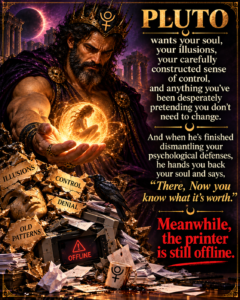
Meanwhile, the printer is still offline.